
We are excited to announce that one of the most powerful features ever added to Tube Sites Submitter is now officially available for all users.
The AI Video Description Generator, which has been tested in beta over the past weeks, is now fully released and ready to use in the latest version of the application.
This new feature dramatically simplifies the entire process of preparing videos for upload to multiple tube sites.
Until now, users had to manually create titles, descriptions, and tags for every video they wanted to upload. With the new AI system integrated into Tube Sites Submitter, this process becomes almost completely automated.
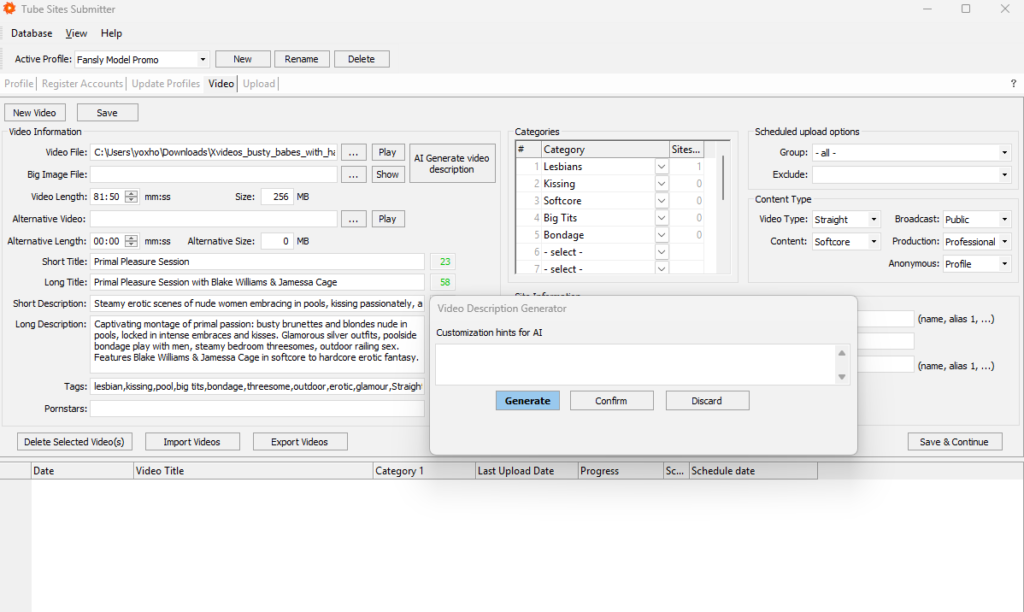
When preparing a video for upload in Tube Sites Submitter, simply select your video file and run the AI Generated Video Description function. The AI will automatically analyze the video content itself — not just a thumbnail or image — and generate all the necessary metadata for you.
Within seconds, the system automatically creates:
- short title
- long title
- short description
- long description
- relevant tags
The AI analyzes the actual video content, understands what is happening in the clip, and generates text that accurately matches the video.
In addition to the AI-generated metadata, Tube Sites Submitter automatically detects technical information about the video, such as video length and file size. These details are automatically filled in during Step 4 – Video Settings, which further speeds up the entire video preparation process.
This means the entire workflow of preparing videos for upload becomes dramatically faster. Instead of manually writing descriptions and tags, you can prepare videos for upload in just a few seconds.
For users who upload large volumes of videos to multiple tube sites, this feature can save hours of work every week.
The AI Video Description Generator is now available to all users in the latest version of Tube Sites Submitter.
If you are already using the application, simply update to the newest version and start using the feature immediately.
How to Update Tube Sites Submitter
Updating Tube Sites Submitter to the latest version is very simple.
The self-update process starts automatically when you launch the application. If Tube Sites Submitter is currently running and processing tasks, simply allow all running processes to finish first.
Once all processes are completed, close the application and start Tube Sites Submitter again. The automatic update system will launch and update the entire application to the latest version.
After the update is finished, you can immediately start using the new AI Video Description Generator feature.